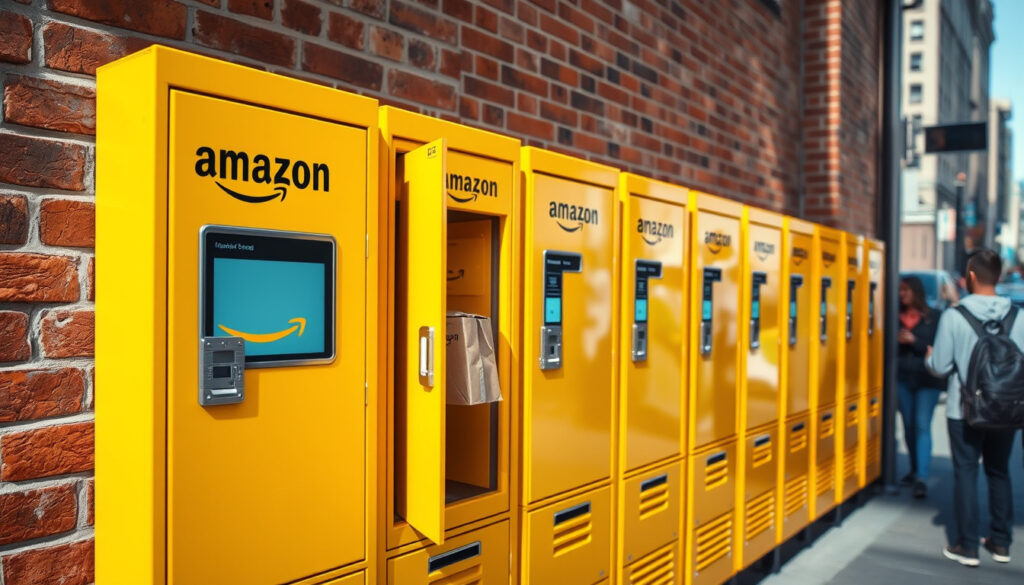
Amazon Locker Near Me: Find & Use for Package Pickup
You’ve probably passed one without realizing it — a bright yellow kiosk in the corner of a grocery store or the lobby of an apartment building. It’s an Amazon Locker, and it might be the most convenient way to get your packages delivered without worrying about porch pirates or missed delivery windows.
Countries with Amazon Lockers: 15 ·
Free to use: Yes ·
Package pickup time limit: 3 days ·
Maximum package dimensions: 42 x 35 x 32 cm
Quick snapshot
- Search by address or ZIP code on Amazon’s site (About Amazon, Amazon’s official news site)
- Use LockerMap for global locations (LockerMap, independent aggregator)
- Check hours of operation (About Amazon, Amazon’s official news site)
- Select during checkout as shipping address (About Amazon, Amazon’s official news site)
- Add to address book for future orders (Business Insider, established editorial publication)
- Receive and enter your pickup code (About Amazon, Amazon’s official news site)
- Initiate return in Your Orders (Business Insider, established editorial publication)
- Choose Locker drop-off at checkout (Business Insider, established editorial publication)
- Get a refund confirmation (About Amazon, Amazon’s official news site)
- No hazardous or oversized items (About Amazon, Amazon’s official news site)
- Age-restricted products not allowed (About Amazon, Amazon’s official news site)
- Packages must be picked up within 3 days (About Amazon, Amazon’s official news site)
| Countries with Amazon Lockers | 15 (LockerMap, independent aggregator) |
| Maximum package dimensions | 42 x 35 x 32 cm (About Amazon, Amazon’s official news site) |
| Maximum package weight | 10 kg (About Amazon, Amazon’s official news site) |
| Package storage period | 3 business days (About Amazon, Amazon’s official news site) |
How do I use an Amazon Locker?
Using an Amazon Locker is straightforward — think of it as choosing a delivery address like any other, except the address is a self-service kiosk.
For regular shoppers, Lockers eliminate porch theft and missed deliveries. The trade-off: you must collect within 3 days, and some items won’t qualify.
Step 1: Choose a Locker during checkout
- When checking out on Amazon, go to the Shipping address step.
- Select “Pickup location” and choose an Amazon Locker near you from the list (About Amazon, Amazon’s official news site).
- You can also filter by distance, hours, and accessibility (e.g., “Use lower Locker Slots” for mobility needs) (Business Insider, established editorial publication).
Step 2: Add the Locker address to your address book
- After selecting a Locker, click “Add to address book” to save it for one-click use later (Business Insider, established editorial publication).
- You can manage saved Lockers from “Your Addresses” in your account settings (About Amazon, Amazon’s official news site).
Step 3: Receive your delivery confirmation code
- Once the package arrives at the Locker, Amazon sends a delivery confirmation email or SMS with a unique 6-digit code (About Amazon, Amazon’s official news site).
- You can also get the code by scanning a barcode or using the Amazon app, depending on the Locker model (Business Insider, established editorial publication).
Step 4: Pick up your package within 3 days
- Go to the Locker location, enter your code on the touchscreen (or tap your phone via Bluetooth for screenless Lockers), and the locker door opens (About Amazon, Amazon’s official news site).
- If you don’t have a phone, write down the code from the email and enter it at the kiosk (About Amazon, Amazon’s official news site).
- You have 3 business days to collect the package. After that, it is returned to Amazon and you are refunded (About Amazon, Amazon’s official news site).
How do I find my Amazon locker?
Using the Amazon website or app
- On Amazon’s website, go to “Pickup locations” and enter your address or ZIP code to see nearby Lockers (About Amazon, Amazon’s official news site).
- Amazon Hub’s dedicated page (Amazon.com, official hub page) also lists locations with filters for hours and accessibility.
Using third-party tools like LockerMap
- LockerMap is an independent aggregator that maps Amazon Lockers and Counters across 15 countries, useful for travelers or those without an Amazon account (LockerMap, independent aggregator).
Searching by address, ZIP code, or landmark
- Amazon’s search tool returns Lockers near your input, complete with street address, hours, and a map (About Amazon, Amazon’s official news site).
- You can also search for “Amazon Locker + [city]” on search engines to find user reviews and photos of specific locations.
The pattern: Amazon’s own tool is the most reliable and up‑to‑date; LockerMap adds a global perspective but may lag behind official data. For a quick check, Amazon’s website should be your first stop.
What is an Amazon Locker location?
There are two main types of Amazon pickup locations: Lockers and Counters. Both serve the same purpose but work differently.
Types of pickup locations: Lockers and Counters
- Amazon Lockers are self-service bank‑style kiosks where you enter a code and retrieve your package from a compartment (LockerMap, independent aggregator).
- Amazon Counters are staffed retail locations (like a convenience store) where you present your pickup code at the counter and receive your package (Business Insider, established editorial publication).
Where you typically find Amazon Lockers
- Grocery stores, shopping malls, convenience stores, and transit hubs (Business Insider, established editorial publication).
- Apartment building lobbies, office buildings, and college campuses.
How to identify a Locker location
- They are usually bright yellow or blue kiosks with the Amazon logo, clearly labeled “Amazon Locker” or “Amazon Hub.”
- Screenless Lockers may have a Bluetooth symbol for app‑based opening (Business Insider, established editorial publication).
Knowing the difference helps you set expectations: Lockers offer 24/7 access (though not all), while Counters have business hours. If you need after‑hours pickup, prioritize a Locker over a Counter.
What cannot be delivered to Amazon Locker?
Prohibited items (hazardous, oversized, age-restricted)
- Hazardous materials like aerosols, lithium batteries (above certain capacity), and flammable liquids (About Amazon, Amazon’s official news site).
- Packages exceeding 10 kg weight or 42 x 35 x 32 cm dimensions (About Amazon, Amazon’s official news site).
- Alcohol, tobacco, prescription medications, and other age‑restricted items (About Amazon, Amazon’s official news site).
Why some items are excluded
- Safety regulations prohibit hazardous goods in unsupervised kiosks.
- Size/weight constraints are physical: the locker compartments have fixed dimensions.
- Age‑restricted items require face‑to‑face age verification, which a self‑service kiosk cannot provide.
How to check if your item qualifies for Locker delivery
- During checkout, the Locker option will only appear if your entire cart is eligible. If it doesn’t show, at least one item in your cart is excluded.
- You can also check product dimensions and weight on the product page – if they exceed the limits, look for an alternative.
The catch: Many everyday items qualify, but large electronics, bulk groceries, and certain household products won’t. Always verify before ordering to avoid last‑minute surprises.
How do I get my stuff from an Amazon Locker?
Step-by-step collection process
- Arrive at the Locker location and tap “Pick up packages” on the touchscreen.
- Enter your 6‑digit pickup code – it’s case‑sensitive and usually alphanumeric (About Amazon, Amazon’s official news site).
- For screenless Lockers, open the Amazon app and tap “Open” – it connects via Bluetooth and opens the correct door (Business Insider, established editorial publication).
- Take your package and close the door. You’ll receive a confirmation email that the pickup was successful.
What to bring (code and ID if required)
- Bring the code (written down or on your phone). Most Lockers don’t require ID, but some high‑value shipments may ask for a signature – in that case, a photo ID is needed (Business Insider, established editorial publication).
- If you’re picking up for someone else, you need their pickup code and a copy of their ID (or they can transfer the pickup via the Amazon app).
What happens if you miss the pickup window
- After 3 business days, the package is automatically returned to Amazon, and a refund is issued (About Amazon, Amazon’s official news site).
- If you know you’ll miss the window, you can try to change the delivery address after ordering, but only if the package hasn’t already been shipped. This is possible from Your Orders (Business Insider, established editorial publication).
Missing the pickup window isn’t the end of the world – you get a full refund – but it delays your order by several days. Set a reminder on your phone for day two to avoid the hassle.
Confirmed facts & what’s unclear
Confirmed facts
- Amazon Lockers are free to use for Amazon purchases (About Amazon, Amazon’s official news site)
- A pickup code is required to open the locker (About Amazon, Amazon’s official news site)
- Packages must be collected within 3 business days (About Amazon, Amazon’s official news site)
- Amazon Lockers are available in 15 countries (LockerMap, independent aggregator)
- Eligible items must weigh less than 10 kg and fit within 42 x 35 x 32 cm (About Amazon, Amazon’s official news site)
- Items must be sold or fulfilled by Amazon (About Amazon, Amazon’s official news site)
- Uncollected packages are automatically returned and refunded (About Amazon, Amazon’s official news site)
- You can pick up without a phone by using the code from the email (About Amazon, Amazon’s official news site)
- Amazon Counters are staffed retail locations for pickup (Business Insider, established editorial publication)
What’s unclear
- Exact number of Locker locations worldwide – Amazon does not publish a running tally.
- Whether all Lockers are 24/7 accessible – many are inside shopping centers with limited hours.
- If third‑party Locker networks (like those from UPS or FedEx) will integrate with Amazon in the future.
- Whether some Lockers require a smartphone for screenless models – not all locations have staff to assist.
“Go to Amazon pickup. Search by address, Zip Code, or landmark.”
“These are just a few of the convenient locations where customers can pick up their Amazon packages.”
— Business Insider, established editorial publication
For someone in Ireland, the UK, or the US who often has packages delivered while they’re at work, an Amazon Locker is a practical alternative to home delivery — provided you can stick to the 3‑day window. For travelers, it’s even better: you can have packages waiting for you at a Locker near your hotel. The choice is clear: if you value security and flexibility over immediate doorstep delivery, start using a Locker today.
For those looking to avoid porch theft entirely, a detailed guide on Amazon Lockers provides comprehensive instructions for finding and using these secure pickup points.
Frequently asked questions
Can I use an Amazon Locker for non-Amazon packages?
No – Amazon Lockers only accept packages purchased from Amazon (sold or fulfilled by Amazon). Third‑party sellers may also be eligible if they use Amazon fulfillment (About Amazon, Amazon’s official news site).
What happens if I don’t collect my package on time?
After 3 business days, the package is returned to Amazon and you receive a full refund. There is no fee for missed pickup (About Amazon, Amazon’s official news site).
Do I need an Amazon account to use a Locker?
Yes – you need an Amazon account to order items for Locker delivery. However, anyone can find and view Locker locations without an account via Amazon’s pickup location finder (About Amazon, Amazon’s official news site).
Can someone else pick up my package from a Locker?
You can share your pickup code with someone else, but some locations may ask for photo ID if the name on the package doesn’t match. To be safe, transfer pickup access via the Amazon app (Business Insider, established editorial publication).
How do I change my delivery address to a Locker after I’ve ordered?
If the order hasn’t shipped yet, go to Your Orders, select “Change delivery address,” and choose a Locker from your saved locations. Once shipped, you cannot change the address (Business Insider, established editorial publication).
Are Amazon Lockers secure?
Yes – each locker compartment is individually locked and monitored. The area around the locker is often under surveillance. However, you should still collect packages promptly as the kiosk is in a public space (About Amazon, Amazon’s official news site).
Can I return an item to any Amazon Locker?
Yes – you can select any Locker as the return drop‑off point when initiating a return in Your Orders. Not all Lockers accept returns, so check the availability during the return process (Business Insider, established editorial publication).
What should I do if the Locker door doesn’t open?
First, try re‑entering the code or refreshing the Bluetooth connection in the app. If it still doesn’t open, contact Amazon customer service through the app or call the number on the kiosk. They can remotely unlock the door or schedule an alternative pickup (About Amazon, Amazon’s official news site).
More related posts
 Woody Allen: Controversies, Career, and Actor Reactions
 Halal Breakfast Near Me – Top Spots, Apps and Delivery Guide
 Jerry Seinfeld Net Worth: Biography, Wife and Controversy
 Janelle Monáe: LGBTQ Identity, Career, and Pansexuality
 Hailee Steinfeld: True Grit Star’s Life and Career
 Plumbing Supply Near Me: Ireland’s Top Trade Stores
 Clint Eastwood 2025: Age, Net Worth, Family & Politics
 Aimee-Ffion Edwards: Age, Peaky Blinders, and Personal Life